Friday, December 6, 2013

The Clock is Simple No More

Well it is really awesome to say that the clock is no longer that simple because I added a few more features to make it a nice clock, it is not yet the final version because I have tons of ideas to make a one hell of a device which I can call one of my best projects ever!

The New Features
 I've added 3 new features which are as follows:
1. 2 new buttons to control the brightness. This is just a temporary version, I just want to check whether it is nice to have a button and to control the brightness. It turns out that yes, it is indeed needed. I still am thinking  if I will make this permanent because I plan to control the brightness, contrast, set time and date, store important dates and alarms using the pc. I connected the 2 buttons using the schematic below:


2. A back-up battery with Charger and DC-DC Step Up converter. The clock will not be connected to the pc 90% of the time so a battery is needed to power it up and must be rechargeable just like cellphone. I used the AREF pin to bypass the on board  regulator of the arduino because it is not efficient. The battery is rated 3.6V so it is not enough to power-up the arduino that is why I need to bost that voltage to 5V using the DC-DC Step-up converter. Below is the connection diagram I used:


3. A software feature to monitor the battery charge. Using the diagram above, I connected A1(analog pin 1) of the arduino to the positive terminal of the battery to measure current charge of the battery. I used the following codes:


    val3 = val3 + analogRead(1);
    charglim++;
    if(charglim>40)
    {
    val3 = val3/charglim; 

    val1 = val3/204.6; //0-5V

    charglim = 0;
    val3 = 0;  
  }
analogRead(1) will return values between 0 to 1023 which is summed up to val3 40 times and the average is taken and converted to voltage reading.

Here's the actual pictures of the components I used:


Some of the components I used can be bought from my sulit shop http://n92seller.sulit.com.ph

Thursday, November 28, 2013

The Simple Clock just got an upgrade!

Having a digital clock that is active the whole day does not only consumes a lot of electricity but might damage the lcd in the short term so I thought I should add another feature to automatically turn off the lcd. This clock is meant to sit on a desktop so I will be too lazy to push  a button just to check the time. A perfect solution to this is to add an Ultrasonic sensor module. With this device connected to an Arduino, all I have to do is to place my hand at least 40cms away from it and it turns on the lcd automatically.

Here is how I connected the ultrasonic sensor to the Aceduino:
There are quite a few sample sketches on the web how to make the ultrasonic sensor work and based on my experience, I was able to make it work in just a about 5 mins because all I have to do is cut and paste the code and added an indicator at the buttom of the lcd to show the current measurement being made by the sensor.

To turn on-off the lcd via code is very simple, it is just an if-then-else statement and setting all digital pins used by the lcd to input to turn it off and output to turn it on.

Here is the sample video of the working digital clock:


And finally here is the sketch I used:

#include <Adafruit_GFX.h>
#include <Adafruit_PCD8544.h>
#include "Wire.h"

#define DS1307_ADDRESS 0x68
byte zero = 0x00; //workaround for issue #527
// pin 7 - Serial clock out (SCLK)3
// pin 6 - Serial data out (DIN)4
// pin 5 - Data/Command select (D/C)5
// pin 4 - LCD chip select (CS)7
// pin 3 - LCD reset (RST)6
Adafruit_PCD8544 display = Adafruit_PCD8544(3, 4, 5, 7, 6);
#define echoPin 8 // Echo Pin
#define trigPin 9 // Trigger Pin
#define NUMFLAKES 10
#define XPOS 0
#define YPOS 1
#define DELTAY 2
float i;
float ii;
float yy;
int xk;
int xl;
  int second1;
  int minute1;
  int hour1; //24 hour time
  int weekDay1; //0-6 -> sunday - Saturday
  int monthDay1;
  int month1;
  int year1;
#define LOGO16_GLCD_HEIGHT 16
#define LOGO16_GLCD_WIDTH  16

long duration, distance; // Duration used to calculate distance
long distance1;
void setup()   {
    Wire.begin();
  Serial.begin(9600);
  pinMode(10, OUTPUT);
  analogWrite(10, 950);
  display.begin();
  display.clearDisplay();
  display.setContrast(45);
//Ultrasonic sensor settings
   pinMode(trigPin, OUTPUT);
   pinMode(echoPin, INPUT);

//setDateTime();
}

void loop() {
//  analogWrite(10, ii);

 digitalWrite(trigPin, LOW);
// delayMicroseconds(1);

 digitalWrite(trigPin, HIGH);
// delayMicroseconds(5);

 digitalWrite(trigPin, LOW);
 duration = pulseIn(echoPin, HIGH);

 //Calculate the distance (in cm) based on the speed of sound.
 distance = duration/58.2;

  printDate();
i = i + 0.05;
if(xk==1)
{
yy = (sin(i) * 4) + 34;
    display.drawPixel(i*2.95, yy, WHITE);
yy = (sin(i*-1) * 4) + 34;
    display.drawPixel(i*2.95, yy, WHITE);
}
else
{
yy = (sin(i) * 4) + 34;
    display.drawPixel(i*2.95, yy, BLACK);
yy = (sin(i*-1) * 4) + 34;
    display.drawPixel(i*2.95, yy, BLACK); 
}
  display.display();
  delay(50);
 
 if(i>33){
  ii++ ; 
  i=0;
  //display.clearDisplay();
   second1=0;
   minute1=0;
   hour1=0;
   weekDay1=0;
   monthDay1=0;
   month1=0;
   year1=0;
   if(xk==1)
   {
     xk = 0;
   }
   else
   {
    xk=1;
   } 
 }

 if(ii>1){
 xl = 1;
 pinMode(10, INPUT); //turns off the backlight

// turns off the lcd
 display.setContrast(0);
    pinMode(3, INPUT);
    pinMode(4, INPUT);
    pinMode(5, INPUT);
    pinMode(5, INPUT);
    pinMode(7, INPUT);
  pinMode(trigPin, OUTPUT);
  pinMode(echoPin, INPUT);
  ii=0;
 }

  if((distance<40) and (xl==1)){//turns on the lcd
xl = 0;
ii=0;
 pinMode(10, OUTPUT);//turns on the back light

// power_twi_enable();
    pinMode(3, OUTPUT);
    pinMode(4, OUTPUT);
    pinMode(5, OUTPUT);
    pinMode(5, OUTPUT);
    pinMode(7, OUTPUT);
display.setContrast(45);
 }
}
void setDateTime(){

  byte second =      15; //0-59
  byte minute =      00; //0-59
  byte hour =        16; //0-23
  byte weekDay =     2; //1-7
  byte monthDay =    26; //1-31
  byte month =       11; //1-12
  byte year  =       13; //0-99

  Wire.beginTransmission(DS1307_ADDRESS);
  Wire.write(zero); //stop Oscillator

  Wire.write(decToBcd(second));
  Wire.write(decToBcd(minute));
  Wire.write(decToBcd(hour));
  Wire.write(decToBcd(weekDay));
  Wire.write(decToBcd(monthDay));
  Wire.write(decToBcd(month));
  Wire.write(decToBcd(year));

  Wire.write(zero); //start

  Wire.endTransmission();

}

byte decToBcd(byte val){
// Convert normal decimal numbers to binary coded decimal
  return ( (val/10*16) + (val%10) );
}

byte bcdToDec(byte val)  {
// Convert binary coded decimal to normal decimal numbers
  return ( (val/16*10) + (val%16) );
}

void printDate(){

  // Reset the register pointer
  Wire.beginTransmission(DS1307_ADDRESS);
  Wire.write(zero);
  Wire.endTransmission();

  Wire.requestFrom(DS1307_ADDRESS, 7);

  int second = bcdToDec(Wire.read());
  int minute = bcdToDec(Wire.read());
  int hour = bcdToDec(Wire.read() & 0b111111); //24 hour time
  int weekDay = bcdToDec(Wire.read()); //0-6 -> sunday - Saturday
  int monthDay = bcdToDec(Wire.read());
  int month = bcdToDec(Wire.read());
  int year = bcdToDec(Wire.read());
 
  display.setTextSize(1);


     if(month!=month1)
  {
  display.setCursor(10,0); 
  display.setTextColor(WHITE);
   display.print(month1);
  display.setCursor(10,0); 
    if((month<=10) and (month>0))
  {
    display.print("0");
  }    
  display.print(month1);
    display.setCursor(10,0);
  display.setTextColor(BLACK);
    if(month<10)
  {
    display.print("0");
  }
  display.print(month);
 
  month1 = month;
   }       


   display.setCursor(26,0);
  display.print("/");
 

     if(monthDay!=monthDay1)
  {
  display.setCursor(34,0); 
  display.setTextColor(WHITE);
   display.print(monthDay1);
  display.setCursor(34,0); 
    if((monthDay<=10) and (monthDay>0))
  {
    display.print("0");
  }    
  display.print(monthDay1);
    display.setCursor(34,0);
  display.setTextColor(BLACK);
    if(monthDay<10)
  {
    display.print("0");
  }      
  display.print(monthDay);
  monthDay1 = monthDay;
   }       

   display.setCursor(50,0);
  display.print("/");
 

    if(year!=year1)
  {
  display.setCursor(58,0); 
  display.setTextColor(WHITE);
   display.print(year1);
  display.setCursor(58,0); 
    if((year<=10) and (year>0))
  {
    display.print("0");
  }  
  display.print(year1);
    display.setCursor(58,0);
  display.setTextColor(BLACK);
     if(year<10)
  {
    display.print("0");
  }    
  display.print(year);
  year1 = year;
   }      

display.setTextSize(2);
    if(hour!=hour1)
  {
  display.setCursor(0,12); 
  display.setTextColor(WHITE);
    display.print(hour1);
  display.setCursor(0,12); 
    if((hour<=10) and (hour>0))
  {
    display.print("0");
  }  
  display.print(hour1);
    display.setCursor(0,12);
  display.setTextColor(BLACK);
     if(hour<10)
  {
    display.print("0");
  }  
  display.print(hour);
  hour1 = hour;
   }    

   display.setCursor(21,12);
  display.print(":");
 

    if(minute!=minute1)
  {
  display.setCursor(31,12); 
  display.setTextColor(WHITE);
    display.print(minute1);
  display.setCursor(31,12); 
    if((minute<=10) and (minute>0))
  {
    display.print("0");
  }
  display.print(minute1);
    display.setCursor(31,12);
  display.setTextColor(BLACK);
      if(minute<10)
  {
    display.print("0");
  }
  display.print(minute);
  minute1 = minute;
   }  

   display.setCursor(52,12);
  display.print(":");

  
  if(second!=second1)
  {
  display.setCursor(60,12); 
  display.setTextColor(WHITE);
  display.print(second1);
  display.setCursor(60,12); 
    if((second<=10) and (second>0))
  {
    display.print("0");
  }
  display.print(second1);
    display.setCursor(60,12);
  display.setTextColor(BLACK);
    if(second<10)
  {
    display.print("0");
  }
  display.print(second);
  second1 = second;
   }  
   display.setTextSize(1);
    if(distance!=distance1)
  {
  display.setCursor(34,40); 
  display.setTextColor(WHITE);
   display.print(distance1);
  display.setCursor(34,40); 
    if((distance<=10) and (distance>0))
  {
    display.print("0");
  }    
  display.print(distance1);
    display.setCursor(34,40);
  display.setTextColor(BLACK);
    if(distance<10)
  {
    display.print("0");
  }
  display.print(distance);
 
  distance1 = distance;
   }     

}

Monday, November 25, 2013

A Simple Clock using Nokia 5110 LCD Module

It is a lazy Monday morning and while daydreaming, I came up with an idea of creating a simple digital clock. I know it is simple because I have the components needed to create it.

The components needed for this simple project is as follows:
1. Nokia LCD Module
2. Aceduino Uno
3. RTC(real time clock) DS1307 Module
4. 12 male-female dupont wires

On the software side I will be using the following:
1. Arduino programming software
2. Adafruit Nokia 5110 Graphics Library

Connecting the components together is very easy and can be done in about 2 minutes.

RTC Module uses the I2C communication Protocol while the Nokia Lcd Module needs 6 digital pins to make it work and no standard communication protocol is needed to make it work.  See the following connection diagrams how the 2 modules should be connected to Arduino.


I used Adafruit's Grpahics Library to generate the small and big numbers and the animated sine wave at the buttom. Adafruit's Graphics Library contains almost all the necessary features needed but I noticed that the library is not capable of controlling the brightness of the backlight so I cleverly invented my own way of controlling it.

I did it by connecting the Light pin of the lcd module to PWM pin 10 of the Aceduino Uno. And here are some commands needed to control the back light:

1. pinMode(10, OUTPUT); - turns on the back light
2. pinMode(10, INPUT); - turns off the back light
3. analogWrite(10, X); - control the brightness(X can be from 0 to 1023 and 0 being the brightest)

Here is the video of the digital clock:

Here is the rest of the sketch I used:
#include <Adafruit_GFX.h>
#include <Adafruit_PCD8544.h>
#include "Wire.h"
#define DS1307_ADDRESS 0x68
byte zero = 0x00; //workaround for issue #527
// pin 7 - Serial clock out (SCLK)3
// pin 6 - Serial data out (DIN)4
// pin 5 - Data/Command select (D/C)5
// pin 4 - LCD chip select (CS)7
// pin 3 - LCD reset (RST)6
Adafruit_PCD8544 display = Adafruit_PCD8544(3, 4, 5, 7, 6);

#define NUMFLAKES 10
#define XPOS 0
#define YPOS 1
#define DELTAY 2
float i;
float ii;
float yy;
int xk;
  int second1;
  int minute1;
  int hour1; //24 hour time
  int weekDay1; //0-6 -> sunday - Saturday
  int monthDay1;
  int month1;
  int year1;
#define LOGO16_GLCD_HEIGHT 16
#define LOGO16_GLCD_WIDTH  16
void setup()   {
    Wire.begin();
  Serial.begin(9600);
  pinMode(10, OUTPUT);
  analogWrite(10, 950);
  display.begin();
  display.clearDisplay();
  display.setContrast(45);
//setDateTime();
}

void loop() {
//  analogWrite(10, ii);
// ii++ ;
  printDate();
i = i + 0.05;
if(xk==1)
{
yy = (sin(i) * 5) + 37;
    display.drawPixel(i*2.95, yy, WHITE);
yy = (sin(i*-1) * 5) + 37;
    display.drawPixel(i*2.95, yy, WHITE);
}
else
{
yy = (sin(i) * 5) + 37;
    display.drawPixel(i*2.95, yy, BLACK);
yy = (sin(i*-1) * 5) + 37;
    display.drawPixel(i*2.95, yy, BLACK); 
}
  display.display();
  delay(50);
 
 if(i>33){
  i=0;
  //display.clearDisplay();
   second1=0;
   minute1=0;
   hour1=0;
   weekDay1=0;
   monthDay1=0;
   month1=0;
   year1=0;
   if(xk==1)
   {
     xk = 0;
   }
   else
   {
    xk=1;
   } 
 }

// if(ii>1023){
//  ii=0;

// }
}
void setDateTime(){

  byte second =      45; //0-59
  byte minute =      04; //0-59
  byte hour =        20; //0-23
  byte weekDay =     1; //1-7
  byte monthDay =    25; //1-31
  byte month =       11; //1-12
  byte year  =       13; //0-99

  Wire.beginTransmission(DS1307_ADDRESS);
  Wire.write(zero); //stop Oscillator

  Wire.write(decToBcd(second));
  Wire.write(decToBcd(minute));
  Wire.write(decToBcd(hour));
  Wire.write(decToBcd(weekDay));
  Wire.write(decToBcd(monthDay));
  Wire.write(decToBcd(month));
  Wire.write(decToBcd(year));

  Wire.write(zero); //start

  Wire.endTransmission();

}

byte decToBcd(byte val){
// Convert normal decimal numbers to binary coded decimal
  return ( (val/10*16) + (val%10) );
}

byte bcdToDec(byte val)  {
// Convert binary coded decimal to normal decimal numbers
  return ( (val/16*10) + (val%16) );
}

void printDate(){

  // Reset the register pointer
  Wire.beginTransmission(DS1307_ADDRESS);
  Wire.write(zero);
  Wire.endTransmission();

  Wire.requestFrom(DS1307_ADDRESS, 7);

  int second = bcdToDec(Wire.read());
  int minute = bcdToDec(Wire.read());
  int hour = bcdToDec(Wire.read() & 0b111111); //24 hour time
  int weekDay = bcdToDec(Wire.read()); //0-6 -> sunday - Saturday
  int monthDay = bcdToDec(Wire.read());
  int month = bcdToDec(Wire.read());
  int year = bcdToDec(Wire.read());
 
  display.setTextSize(1);


     if(month!=month1)
  {
  display.setCursor(10,0); 
  display.setTextColor(WHITE);
   display.print(month1);
  display.setCursor(10,0); 
    if((month<=10) and (month>0))
  {
    display.print("0");
  }    
  display.print(month1);
    display.setCursor(10,0);
  display.setTextColor(BLACK);
    if(month<10)
  {
    display.print("0");
  }
  display.print(month);
 
  month1 = month;
   }       


   display.setCursor(26,0);
  display.print("/");
 

     if(monthDay!=monthDay1)
  {
  display.setCursor(34,0); 
  display.setTextColor(WHITE);
   display.print(monthDay1);
  display.setCursor(34,0); 
    if((monthDay<=10) and (monthDay>0))
  {
    display.print("0");
  }    
  display.print(monthDay1);
    display.setCursor(34,0);
  display.setTextColor(BLACK);
    if(monthDay<10)
  {
    display.print("0");
  }      
  display.print(monthDay);
  monthDay1 = monthDay;
   }       

   display.setCursor(50,0);
  display.print("/");
 

    if(year!=year1)
  {
  display.setCursor(58,0); 
  display.setTextColor(WHITE);
   display.print(year1);
  display.setCursor(58,0); 
    if((year<=10) and (year>0))
  {
    display.print("0");
  }  
  display.print(year1);
    display.setCursor(58,0);
  display.setTextColor(BLACK);
     if(year<10)
  {
    display.print("0");
  }    
  display.print(year);
  year1 = year;
   }      

display.setTextSize(2);
    if(hour!=hour1)
  {
  display.setCursor(0,12); 
  display.setTextColor(WHITE);
    display.print(hour1);
  display.setCursor(0,12); 
    if((hour<=10) and (hour>0))
  {
    display.print("0");
  }  
  display.print(hour1);
    display.setCursor(0,12);
  display.setTextColor(BLACK);
     if(hour<10)
  {
    display.print("0");
  }  
  display.print(hour);
  hour1 = hour;
   }    

   display.setCursor(21,12);
  display.print(":");
 

    if(minute!=minute1)
  {
  display.setCursor(31,12); 
  display.setTextColor(WHITE);
    display.print(minute1);
  display.setCursor(31,12); 
    if((minute<=10) and (minute>0))
  {
    display.print("0");
  }
  display.print(minute1);
    display.setCursor(31,12);
  display.setTextColor(BLACK);
      if(minute<10)
  {
    display.print("0");
  }
  display.print(minute);
  minute1 = minute;
   }  

   display.setCursor(52,12);
  display.print(":");

  
  if(second!=second1)
  {
  display.setCursor(60,12); 
  display.setTextColor(WHITE);
  display.print(second1);
  display.setCursor(60,12); 
    if((second<=10) and (second>0))
  {
    display.print("0");
  }
  display.print(second1);
    display.setCursor(60,12);
  display.setTextColor(BLACK);
    if(second<10)
  {
    display.print("0");
  }
  display.print(second);
  second1 = second;
   }  


}

Thursday, October 3, 2013

Portable Charger with Battery Bank Revisited

5 months ago, when I first posted my project, the portable charger with battery bank, I wrote that I am still waiting for the arrival of  4 pcs lithium ion batteries and will be looking for a transparent enclosure so that the battery charge indicator will be exposed. Unfortunately, my batteries did not arrived and had to cancel my order and could not find a nice trasnparent enclosure.

3 weeks ago, I tried to find a similar battery but I also failed so I settled for 4 pcs 900mAH 1.2V lithium ion rechargeable AA batteries. This is way below the original specs but the price is also cheap because each battery cost Php60 only. I will use this batteries just to offset the waiting period for the arrival of my newly ordered  high capacity batteries. I also plan to upgrade my exisitng DC-DC Step up module from 500mAmp output to 1.5mAmp output.

I had been playing with it for a week now and surprisingly all of my tests yielded unexpected results. The current specs is as follows:
1) 5V 1Amp Input derrived from the USB Charging module
2) Battery Bank capacity is 3600mAH. 2pcs connected in series and resulting in 2 pcs of 1800mAH 2.4V and connected them in parallel.
3) 5V 500mAmp output.

I don't expect much juice from that configuration since it's a low-voltage configuration which translates to a much lower mAH in reality.

 Here is the resulting device:


I used electrical tape to hold all 3 pcs together(the batteries, charging module and dc-dc usb step up module) and to hide all the wires in between.

Here are some results of my experiments:
1. Charging time is at least 4hours. 4.2V can never be achieved since the battery bank is only 2.4V as a result the red led in the mini usd charging module will never light up. The red led will light up if a 3.7V battery is fully charged at 4.2V.

2. When fully charged, it can be a temporary power source of an Ipad mini or any Android Tablet for 30 to 45 minutes but could not charge it. This surpassed my expectation since the output is only 500mAmps while the Ipad Mini requires at least 1Amp.

3. It can power up a 12V 0.15Amp dc brushless motor for 30 minutes. I used the 5W DC DC 5-12V Step Module.


Saturday, September 28, 2013

Miniaturized Arduinos

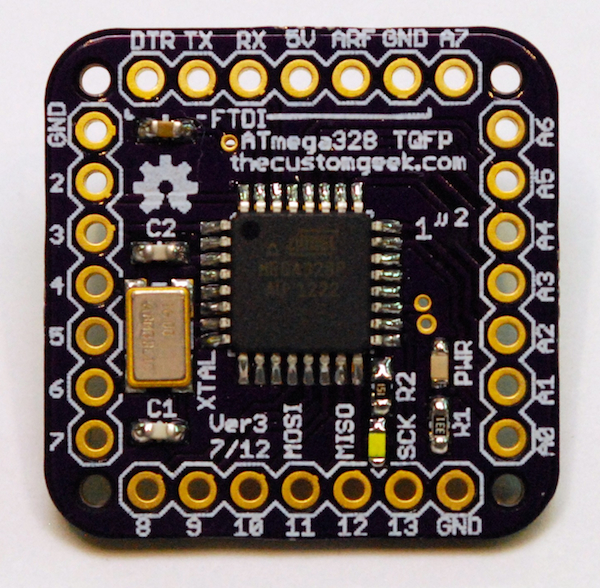
Arduino has become very popular among electronic hobbyist and inventors. And because of it's popularity, a lot of people including me are really waiting for a miniaturized version. I had been searching for this version on the internet and to my surprised, I found 3 interesting flavors, 2 of these are already available in the market and 1 is still in development stage.

These 3 flavors of miniaturized arduinos I am talking about are the following:
1. Microduino
2. Femtoduino
3. One Square Inch of Goodness

Based on my initial assessments and studies, Femtoduino leads the pack because it has a built-in ftdi module which means all I need to upload my sketch is a data cable. But its main drawback is the 0.05" pitch which is not compatible with almost all electronic widgets compatible with the existing arduino. Microduino and One Square Inch of Goodness both uses the 0.1" pitch btw.

In terms of available shields, Microduino is the leader this is because the group responsible for its development is well funded and they have a lot of hands to do major research. The sad thing is, Microduino is still not for sale as of this writing. What I am really looking forward to is the miniaturized version of the arduino mega which they call Microduino Core+.

Femtoduino:
Microduino:
One Square Inch of Goodness:


Monday, May 6, 2013

Updates on my Energy Monitoring Device Project

I had the good opportunity to find a highly skilled Electronic Technician last Sunday. He did an excellent job and I must say his work is almost an Art because the soldering was very consistent and refined see pictures below.


And because of his superb workmanship, I was able to immediately assemble my project and easily made it work.
I also have started working on the software and it is now is in its early stage development.


The charting control is not yet working.

Thursday, May 2, 2013

Energy Monitoring Device with Arduino

Three arduino related products that I ordered from ebay also arrived yesterday. With these 3 amazing products, I can already start developing my Energy Monitoring Device project. This device is a lot  more powerful than the DC Wattmeter and Power Analyzer I featured earlier because it will allow me to monitor the health of my battery bank even when I am away by storing the measured parameters into memory and I will be able to read this stored data later and view it graphically.

The FTDI Basic:


The Arduino Pro Mini:


The Voltage Divider Sensor:


I will first have the leads soldered on the Arduino Pro Mini once that is done, I will now be able to develop the program to allow to it measure voltage across the battery banks.